ip
Duchess User Guide
Duchess is a desktop app to help you manage your tasks. Duchess can be used via a Command Line Interface (CLI) or via a Graphical User Interface (GUI). Below is a user guide on how to use Duchess.
Quick Start
- Ensure you have Java
21or above installed in your Computer. - Download the latest release from here.
- Copy the file to the folder you want to use as the home folder for Duchess.
- Open a command terminal,
cdinto the folder you put the jar file in, and use thejava -jar duchess.jarcommand to run the application. A GUI similar to the below should appear in a few seconds.
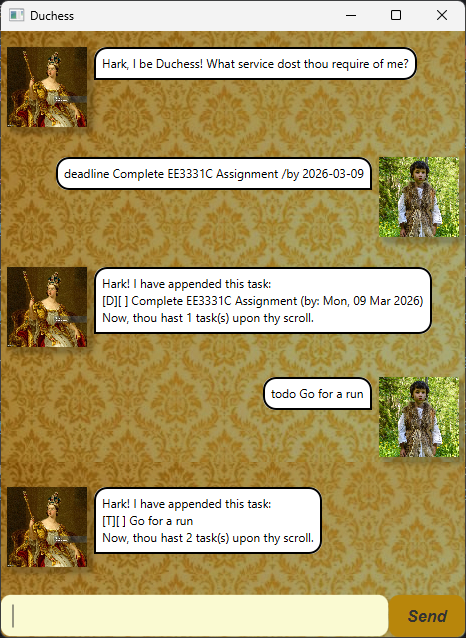
- Type your command in the text box and press enter to execute it.
Some examples of commands are:
todo Go for a run:
Creates a new task calledGo for a run.list:
Lists all tasks.delete 1:
Deletes the first task in your list.
- Refer to the Features below for details of each command.
Features
Notes about the command format:
- Words in
UPPER_CASEare the parameters to be supplied by the user.
e.g. intodo NAME,NAMEis a parameter which can be used astodo Go for a run..- Aside from
NAME, parameters can be in any order.
e.g. if the command specifies/from START_DATE /to END_DATE,/to END_DATE /from START_DATEis also acceptable.- Aside from
NAME, if a parameter is expected only once in the command but multiple parameters are provided,
the last parameter will be taken.
e.g./by 2023-01-01 /by 2023-01-02is taken as/by 2023-01-02.- Extraneous parameters for commands that do not take in parameters (such as
list,cheerandbye) will be ignored.
e.g. if the command specifieslist 123, it will be interpreted aslist.- Duchess supports partial matching of commands for advanced users.
e.g.ch,cheandcwill all match thecheercommand.
Adding a task:
todo: Adds a new task to the list without any additional parameters.
Format: todo NAME
deadline: Adds a new deadline to the list with a deadline date.
Format: deadline NAME /by END_DATE
event: Adds a new event to the list with a start and end date.
Format: event NAME /from START_DATE /to END_DATE
Some notes about the date format:
- Dates must be in the format
YYYY-MM-DD.- Event
START_DATEmust occur beforeEND_DATE.
Deleting a task:
delete: Deletes a task from the list based on the specified task number.
Format: delete INDEX
Listing all tasks:
list: Lists all tasks in the list.
Format: list
Displaying a motivational quote:
cheer: Displays a motivational quote.
Format: cheer
Finding an outstanding task:
outstanding: Finds incomplete tasks at the specified date.
Format: outstanding DATE
An outstanding task should:
- Be incomplete.
- a
deadlineshould end afterDATE.- an
eventshould start on/beforeDATEand end on/afterDATE.todotasks are never considered outstanding.
Finding a task by keyword:
find: Finds tasks based on the specified keyword. Duchess will do partial matching on the keyword.
Format: find KEYWORD
Displaying help:
help: Shows a list of available commands.
Format: help
Marking a task as completed:
mark: Marks a task as completed based on the specified task number.
Format: mark INDEX
Marking a task as incomplete:
unmark: Marks a task as incomplete based on the specified task number.
Format: unmark INDEX
Exiting the program:
bye: Exits the program.
Format: bye
Saving the data
Duchess saves your tasks in your hard disk automatically after any command that modifies your list. There is no need to save manually.
Editing the data file
Duchess saves your tasks as a .txt file [JAR file location]/data/tasks.txt. Advanced users are welcome to update
your tasks directly by editing that data file.
Caution: While Duchess tries to load your data from the file, any data in the wrong format will be ignored. This can lead to a loss of data!
References
English Literature. (2025, July 23). The 100 most famous quotes in english literature. English Literature. https://englishliterature.in/the-100-most-famous-quotes-in-english-literature/
pictore. (2021, June 16). Queen Victoria in her coronation in 1837 -xxxl with lots of details- stock illustration [Photograph]. iStock. https://www.istockphoto.com/en/vector/queen-victoria-in-her-coronation-in-1837-xxxl-with-lots-of-details-gm1323711024-409280322
SE-EDU. (2026, March 1). JavaFX tutorial. SE-EDU. https://se-education.org/guides/tutorials/javaFx.html
Sunriseforever. (2021, May 10). Boy, peasant child, fur vest image [Photograph]. Pixabay. https://pixabay.com/photos/boy-peasant-child-fur-vest-shirt-6240696/
titoOnz. (2017, July 4). Gold damask pattern background stock photo [Photograph]. iStock. https://www.istockphoto.com/photo/gold-damask-pattern-background-gm809072960-130969091